

Portable power station to solar panel: complete 2026 off-grid camping workflow
Instead of taking your camping battery home whenever it runs low, connect a compatible solar panel to your portable power station’s solar input using the manufacturer-approved cable, then check that charging starts. This 2026 workflow covers compatibility, safe connection and daily charging at campsites and fishing pitches in Ireland.
- To connect portable power station to solar panel, match voltage, current, polarity and connectors before plugging in.
- For camping in Ireland, we recommend a compatible solar setup for daytime top-ups, not guaranteed daily replenishment.
- Keep the power station dry and ventilated; put the panel where it receives unobstructed sunlight.
- Check actual solar input and battery level before adding your camping loads.
Why this matters
A plug that fits does not prove electrical compatibility. Your panel’s output must suit the power station’s solar controller. An adapter changes the connection, not the voltage the station can safely accept.
If you are still choosing equipment for a 2026 trip, start with our guide to portable power stations for camping and campervans in Ireland. Choose the station around your essential loads, then match the solar panel to its input limits.
For camping in Ireland, we recommend solar charging as a daytime top-up rather than your only source of essential power. Cloud, shade and short winter days affect what reaches the battery. Start with a charged station and keep a separate plan for essential communications.
Solar also separates two jobs. The panel collects energy outside. The station stores it and powers your equipment from a dry, ventilated position. Neither needs to sit beside the other if an approved extension cable safely reaches between them.
Before you start
- Gather the equipment and manuals. You need a portable power station with a documented solar input, a compatible panel, the specified charging cable and any approved adapter. Download the manuals before leaving mobile coverage.
- Find the electrical limits. Record the station’s solar operating voltage range, maximum input voltage, permitted current and power, connector specification and polarity. Compare these with the panel’s open-circuit voltage, operating voltage, current and rated power.
- Check the easily missed limit: cold-weather voltage. Panel open-circuit voltage rises as temperature falls. Use the manufacturer’s cold-weather compatibility guidance; a panel that appears suitable from its nominal voltage alone can exceed the station’s maximum input voltage.
No account or app is inherently required for solar charging. Follow your station’s manual if that particular model requires activation or settings changes. Do not make a first-time campsite connection depend on an app you have not configured.
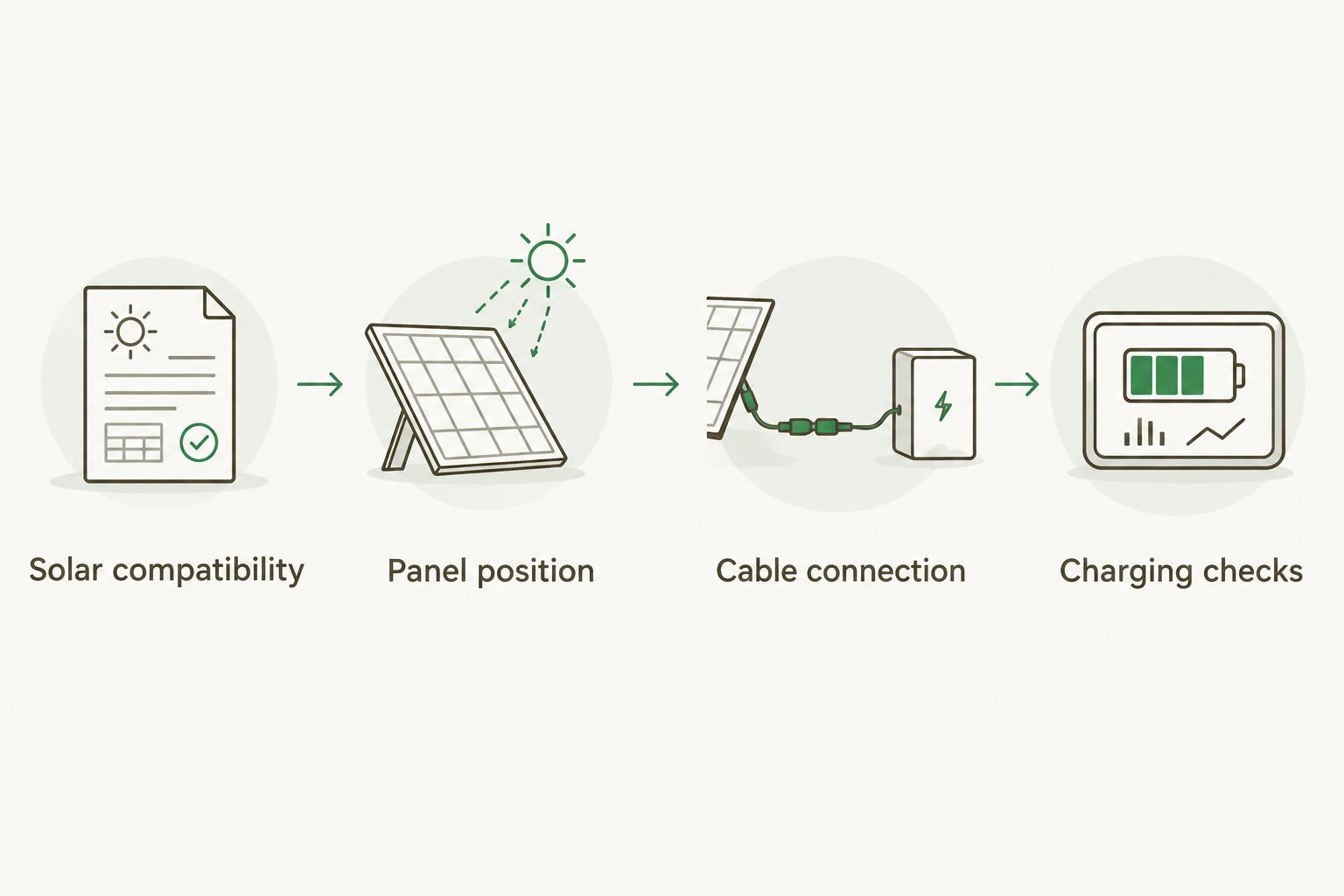
Solar compatibility
- Read the station’s solar-input specification. Identify the physical input port from the manual and match it to the unit. Do not assume a nearby output socket accepts charging power.
- Compare the panel’s electrical label. Open-circuit voltage, often abbreviated Voc, matters for the maximum voltage check. Operating voltage, often Vmp, must suit the controller’s operating range. Check current and power against the manufacturer’s permitted panel configurations too.
- Verify the complete cable. Check the connector at each end, polarity, cable rating and any required adapter. Similar-looking barrel plugs are not automatically interchangeable. Do not force a connector or modify a lead to make it fit.
- Confirm the controller arrangement. A station designed for direct solar input normally contains its own solar charge controller. Feed it as its manual specifies. Do not add an external controller unless the station manufacturer explicitly supports that arrangement.
Expected result: you have a documented match between the panel, cable and station—not just matching plugs.
For a 2026 equipment check, use the exact model’s current manual. Instructions for a different capacity or revision are not a substitute. If the documentation does not resolve a voltage or polarity question, stop and get confirmation from the manufacturer.
Keep a note of the approved pairing with the cable. That makes the next setup quicker and prevents someone substituting a similar-looking lead from another piece of camping equipment.
Panel position
- Choose clear sunlight. Unfold the panel fully and aim its collecting surface towards the sun. Move it away from shadows cast by trees, a vehicle, tent poles or your own shelter.
- Secure the support. Use the panel’s intended stand or mounting arrangement. Keep it stable in wind without covering the collecting surface or damaging the frame.
- Place the station separately. Keep the station dry, shaded and ventilated, within the cable’s safe reach. Follow its stated operating conditions. Do not seal it in a bag or box while charging.
- Route the cable safely. Keep it clear of walking routes, doors, sharp edges and places where vehicles pass. Keep connections off wet ground and protect them as the equipment instructions require.
Expected result: the panel receives unobstructed light, the station has airflow, and the cable is not under tension.
Irish campsite conditions change during a session. Check the pitch for moving shade and pooling water, not just the sunny patch you see on arrival. A sheltered station still needs protection from wind-driven rain and condensation.
A panel’s weather-resistance rating does not automatically apply to its connectors, adapter or power station. Check each component separately. Disconnect and pack away when conditions exceed any component’s stated limits.
Cable connection
- Prepare the station. Place the battery below its configured charge limit so it can accept energy. Disconnect non-essential loads for the first test, and inspect ports and leads for moisture, dirt or damage.
- Reduce panel output before handling connections. Cover or turn the panel away from direct sunlight as the manufacturer instructs. Solar panels generate electricity when illuminated; do not touch exposed contacts or disconnect solar connectors under load.
- Make the connections in the documented order. Follow the station and panel instructions for connecting the charging lead. Seat connectors fully, engage any locks provided and avoid pulling on the cable itself.
- Expose the panel and check charging. Return the panel to sunlight. Use the station’s display or supported app to inspect solar input and charging status. Follow the exact labels shown on your model rather than assuming every station uses the same controls.
Expected result: the station reports incoming solar power or a charging indication, without a fault warning.
Do not improvise if the expected charging indication fails to appear. Return to the specifications and the troubleshooting checks below. Repeatedly swapping unverified adapters does not establish a safe connection.
Charging checks
- Read incoming power. Check the station’s solar input after it recognises the panel. A panel’s rated wattage is not a promise of continuous output at your pitch.
- Improve the position. Adjust the panel towards the sun, remove shade and compare the displayed input. Keep the station’s ventilation and weather protection unchanged while moving the panel.
- Check battery progress. Note the battery level, then check again during charging. Turn off non-essential outputs if you want to establish whether solar alone is replenishing the battery.
- Record the useful settings. Save the approved cable arrangement, panel position and any charge-limit setting you deliberately changed. Restore settings you do not want to carry into normal use.
Expected result: you can distinguish panel input from actual battery replenishment. A charging symbol alone does not tell you whether connected equipment is consuming the incoming energy.
Use watts and watt-hours correctly when planning your 2026 camping setup. A watt, W, measures power. A watt-hour, Wh, measures energy: 1 Wh equals 1 W supplied for 1 hour. A kilowatt-hour, kWh, equals 1,000 Wh.
Input watts tell you what is arriving now; watt-hours tell you how much energy is stored or used. Charging losses, changing sunlight and battery charge management prevent a simple panel-rating calculation from predicting an exact campsite recharge time.
Charge while powering your camping equipment
Running equipment while solar charging is a useful second workflow, but only when the station supports simultaneous charging and output. Check its restrictions first. Support does not mean unlimited output or guaranteed battery replenishment.
| Workflow | Best for | Advantage | Limitation |
|---|---|---|---|
| Charge only | Establishing a clear solar baseline | Removes connected loads from the initial check | Equipment needs another supply during the test |
| Charge with loads | Supported daytime use at camp | Keeps suitable equipment running while solar contributes | Loads can consume more energy than the panel supplies |
To change from charge-only testing to supported simultaneous use:
- Confirm that the station permits the required output while solar charging.
- Connect an essential device through its compatible output and enable that output according to the manual.
- Check both solar input and device consumption wherever the station provides those readings.
- Recheck battery level as sunlight changes. Reduce loads when the battery falls despite solar input.
Expected result: essential equipment works within the station’s output limits, and you know whether the battery is gaining or losing energy.
Use a supported USB or DC connection for compatible devices when practical. This avoids an unnecessary AC conversion stage, but output voltage, connector polarity and device requirements still need checking. Never connect equipment simply because a lead fits.
For a 2026 overnight plan, decide which devices take priority before dusk. Keep enough stored energy for those loads instead of using the remaining battery on optional equipment.
Troubleshooting
No solar input appears
Check that daylight reaches the panel and that the battery is below its charge limit. Confirm the correct input port and fully seated connections. If input remains absent, follow the manual’s safe shutdown procedure before checking the cable specification and polarity.
Do not open the station or probe unfamiliar connectors. Ask the manufacturer to confirm the panel-and-cable pairing if the documentation is unclear.
Input is lower than the panel rating
Remove partial shade, clean the panel according to its instructions and adjust its angle. Check for dirt, cloud and a battery approaching its charging limit. The station’s input ceiling can also restrict accepted power.
Compare changes under similar conditions. Do not diagnose a fault solely because the display differs from the panel’s rated wattage.
Charging starts and stops
Watch whether a moving shadow or passing cloud coincides with the interruption. Check for a loose connection, temperature warning or charge-limit setting. Follow the manual before reseating connectors; never separate solar connectors under load.
If a cable or connector becomes unusually hot, stop using the setup and have it checked.
A voltage or temperature warning appears
Stop charging using the manufacturer’s procedure. Recheck panel compatibility, including cold-weather open-circuit voltage. For temperature warnings, move the station into a suitable environment and let it return to its permitted charging range.
Never bypass a protective warning or heat a cold battery with an improvised heater.
The battery falls while solar is connected
Reduce or disconnect loads and check whether battery level then rises. Solar input can be lower than equipment demand, even while the station shows charging. If input remains absent with loads removed, return to the connection and compatibility checks.
Customise your workflow
For longer stays, build an energy routine before expanding the hardware. Charge before departure, deploy solar when you arrive, check moving shade during the day and reserve stored energy for the evening.
Add panels only when the station manufacturer approves the complete arrangement. Series wiring increases voltage; parallel wiring increases current. Both require compatible equipment, correctly rated connections and checks against the station’s limits. Do not choose a splitter by connector shape alone.
A separate leisure battery is a different system. It requires charging equipment matched to its chemistry and electrical limits; a portable station’s solar instructions are not a battery-wiring guide. Our guide to battery chargers for solar and off-grid camping covers that adjacent planning task.
FAQ
How do I connect a portable power station to a solar panel?
Connect a compatible panel to the station’s documented solar input using the specified cable and connection order. Check voltage, current, polarity and connector compatibility first, then verify charging on the station.
Can I use any solar panel with my portable power station?
No. The panel’s electrical output and connections must meet the station manufacturer’s requirements, including its maximum input voltage and cold-weather guidance.
Do I need a separate solar charge controller?
A station designed for direct solar input normally includes its own controller. Do not add an external controller unless the station manufacturer explicitly supports it.
Can I charge my power station while using it?
Yes, if your model supports simultaneous charging and output for the intended equipment. Connected loads can consume more power than solar supplies, so check battery level as well as input.
Will a solar panel charge my power station on a cloudy day in Ireland?
A solar panel can generate power under cloud, but charging depends on whether its output meets the station’s operating requirements. Do not rely on a guaranteed daily recharge for essential equipment.
Why does my solar panel produce less than its rated wattage?
Actual output depends on sunlight, angle, shade and operating conditions. The station’s input limit and battery charging behaviour can also restrict accepted power.
Can I leave my portable power station outside in the rain?
Only use a station within its manufacturer’s stated environmental limits. A weather-resistant panel does not establish that the station, adapter or cable connections are rain-safe.
One last thing
Test the complete cable chain before you leave home. A fully charged battery can hide a charging problem because the station has no room to accept more energy. Test below the configured charge limit, confirm incoming solar power and pack that verified cable with the station.